Installer portal
 Solar Academy
 Download
 Solar Terminal


Service Code
All the key information about the service code and where to find it in the KOSTAL Solar Terminal.
Service Code
The Service Code (formerly PARAKO Code) for the PLENTICORE and PIKO IQ inverters allows the system-specific shutdown thresholds to be adjusted in line with the grid operator’s requirements. As the system operator is not permitted to change the settings on the inverter, access to the settings via the web server (for PLENTICORE and PIKO IQ) or the configuration software (for PIKO 4.2–36) is protected by a personalised password.
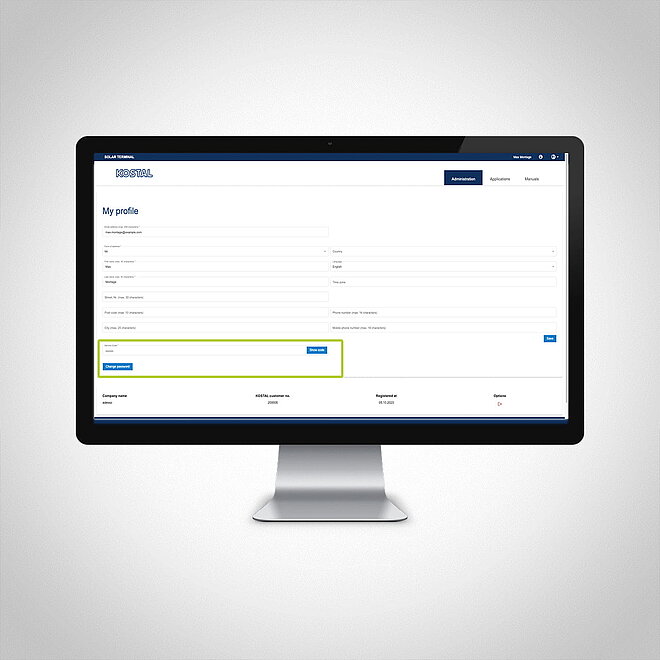
Where can I find the service code?
As an installer, you can find your service code at any time in your user account under ‘My Profile’ in the KOSTAL Solar Terminal.
- Are you already registered as a user on the KOSTAL Solar Terminal? If so, you can view your service code in your profile at any time. Please note that you will need the ‘Installer’ role to do this. If you are not yet registered there as an installer, please ask your company’s administrator to assign you the appropriate role.
- Is your company already registered as a customer in the KOSTAL Solar Terminal and would you like to log in as an employee? If so, please contact your company’s administrator. They will invite you and add you as an employee. Please note that you will be assigned the “Installation” role. This is how you will receive your personal service code.
- Are you and your company not yet registered on the KOSTAL Solar Terminal? If so, please register your company on the KOSTAL Solar Terminal for the first time. Upon registration, you will become the administrator for the KOSTAL Solar Terminal within your company and will be able to add other people within your company by inviting them to the KOSTAL Solar Terminal. To view the service code in your profile, you must be assigned the “Installation” role.